This system works by launching an official Windows image in Docker and then making an RDP connection to it. There are a couple of others too now like WinBoat
What all of them avoid mentioning is that the images were intended by Microsoft for test and development purposes on Windows and the license clearly states you need a valid Windows license to use them: https://hub.docker.com/r/microsoft/windows#license
I wonder if Microsoft will take some action to enforce this if these projects become popular.
Edit: This comment is incorrect, see below comment from doctorpangloss
I see it's time for the bimonthly reinvention of VirtualBox and VMWare's seamless modes from a few faceless techies on GitHub and designed for people who can't be bothered to use WINE or VirtualBox.
And unfortunately it has become the norm in open-source to push out shiny-looking projects with pretty logos and UX but shoddy underlying technology and deceptive/overstated claims (looking at you Tauri).
Thing thing uses RDP for communication which was designed for remotely administering servers over low speed networks.
VirtualBox in contrast integrates at the driver level, and allows you to share the underlying GPU buffers, giving you a native experience that works for things like games or heavy apps. It integrates the Linux filesystem on a driver level as well.
Nit: RDP’s roots are more in multi-user windows like Citrix Metaframe than in remote administration. I’ve found it to perform better than the alternatives (remote X11, VNC, Chrome Remote Desktop) for remote GUIs. Nomachine is the only alternative that was close to its performance.
(And before somebody jumps in to correct me - in ancient times X11 performed quite well over the network but modern Linux GUI apps are no longer designed to minimise X11 network traffic)
From my personal experience (by feel, not scientific), NVIDIA GameStream is way faster than RDP. I used it with Sunshine and Moonlight.
Massive bandwidth usage and video compression artifacts. It's fine for games and media consumption, but may be problematic for office work.
Remote desktop protocols prefer lossless compression to achieve pixel-perfect rendering, at the expense of framerate/latency.
RDP is unique in that it's not just streaming, but integrates with Windows' GUI stack to actually offload compositing to the client. This however works less and less well with web and Electron apps which do not use native OS widgets.
Agreed that RDP is very well designed. And we don't have an equivalent in Linux or Mac world. All competing protocols are a compromise. I am particularly impressed with good multi-monitor support in RDP. Competitions has had more than a decade to get it right. But I am unaware of any that does.
If I connect remotely from a 2 monitor setup, disconnect and re-connect from my laptop with just a single display, it all magically works. Everything readjusts automatically. I don't know of any other remote desktop protocol/tool that does this so well.
Windows implementation of RDP is actually very good. You get a degree of responsiveness that is unachievable with neither Linux RDP implementation or any other product (maybe barring Parsec, that also doesn’t allow for Linux hosts).
I know that RDP doesn’t work for gaming, but for anything else (even for CAD), it’s the best thing barring direct access to the machine (or, Parsec).
Yeah, but if the Windows app essentially draws into a GPU texture (which is mapped to a dmabuf buffer in the Linux kernel), you can just grab that texture and send it to the compositor.
The overhead difference is like memcpy vs a very fast SQL database.
wait is it viable to run CAD (specifically autocad/revit) in any of these? It's the last thing keeping me on Windows
Yes, CAD software is perfectly usable via RDP.
I know this isn't the question you asked, but FreeCAD has made great strides.
sorry if it's a disappointment, but it's a contraction of two video game characters (Knoll + Olimar).
Actually with RemoteFX GPU I think DirectX 9 games or something would work OK over it.
I remember booting Crysis with that. I wouldn't say it was playable, but the fact it managed to actually launch was impressive. Maybe with modern hardware & bandwidths it would actually be.
Why don't they just write a thin layer that interfaces Windows library calls to native Linux calls, possibly with a thin wrapper to shim it where nothing else quite fits? You could re-implement maybe some of the Windows libs as a "clean room project", given the functional description, that then hands off to an equivalent in Linux.
There's probably a cool and snappy acroynm you could use, like Virtual Interface (with nearly) No Overheard, or "Vino".
Care to elaborate regarding tauri? I figured it has matured into a fine electron alternative.
Not OP, but I recall Tauri greatly overstating their memory usage claims. It is ultimately a browser running your "app", but just because it's not bundled with your app, doesn't make it consume any lesser RAM. And they even admitted that their benchmarks were wrong[1].
A lot of claims were also made about how Tauri is magically more performant than Electron apps and feels like a native app, but not only is this not true, on some platforms like Linux, Tauri apps are actually slower than Electron because the system webview it uses (generally WebKitGTK) is often slower and less optimised than the Chromium build that Electron ships with[2].
There's a bunch more claims due to it being "Rust" and all the memes that comes with that territory, but all that is basically irrelevant since your "app" is basically shitty javascript in the end. It's like putting lipstick and dressing up a pig, doesn't change the fact that it's still a pig.
[1] https://github.com/orgs/tauri-apps/discussions/3162
[2] https://www.reddit.com/r/tauri/comments/1kg5zb8/will_tauri_f...
I've done both, I prefer embedded web views:
- All the work is done in my high performance backend, where I joyfully optimise my hot loops to the assembly level. The web view is a thin layer on top.
- HTML and CSS is a joy to work with in comparison to many UI toolkits. LLMs are better at supporting a web stack.
- The UI zooms/scales, and is accessible with screen readers (looking at you, imgui).
- Cross platform with low effort.
IMO you have to be extremely careful not to pull in a whole frontend stack. Stay as vanilla as possible, maybe alpine.js or tailwind, and I've got hot reload set up so the developer productivity loop is tight when editing the view.
Mostly Tauri claimed their main advantage was smaller app sizes since it's using the native WebView. What they didn't say is how a bottomless pit it is to try standardizing rendering on X different webviews, multiplied by X different webview versions (outdated, not updated systems) ; so now they have pivoted to shipping their own build-in browser ; Competition in open-space is okay but it shouldn't be made by only pushing its perceived advantages while withholding the systemic disadvantages.
Well yeah. The goal for most of these people is to pad a portfolio so they can either get or remain gainfully employed. We are in the performative software era. It's not about data structures or algorithms anymore, it's all about GitHub stars.
That's just progress. Things that used to be hard become easy. Things that used to be impossible become hard.
Hard things become easy when for example it becomes feasible to connect to RDP instead of mucking about at the driver level.
It will be more reliable but less performant.
As someone who is looking to go Linux, do most windows apps work now through Wine or VirtualBox ? I know Valve did a lot of work for games.
It’s been 4 years since I even took a good look at it.
Just anecdata, but the few things I use via Wine have all worked fine. I use yabridge so I can use windows VSTs in my Linux DAW.
Games (if they don't use kernel level anti cheat systems) are all flawless with Proton.
But, I honestly don't have a need to use much other windows only software. Almost everything I need to use has Linux versions, or alternatives that fit my needs.
I still have problems running some VSTs with yabridge (could be fixed in an afternoon, but it's important that people should know that it's not a plug and play experience).
I, for one, use Notepad++ with wine. I'm accustomed to it
What do you use in Windows? It's probably easier starting there and then working out what you can do about it.
Games work great in Proton. Valve has gone all-in on Linux and I suspect before terribly long we'll see more stuff that's SteamOS native, with a compatibility layer for the people who are still using Windows.
I would suspect now that most people either play games which will mostly work okay from Steam, or use stuff that just works in a browser (and I'm kind of lumping Electron apps in with that). Then there are things that are never going to work all that well in Wine or have a native Linux port but which might be worth looking into something else for, like switching from Premiere to Resolve for video editing.
About games compatibility made possible by Steam, check Proton DB : https://www.protondb.com/
Bar a few exceptions (gaminh mostly) you'd have a much better experience switching to native linux apps. Most are really good once you get past the resistance to change. It takes a bit of time to get used to some but once you are set you are no less productive.
I did the switch 2 decades ago and except for my annual 3 weeks of gaming, I never use wine nor do I use or feel the need for a win VM.
What windows apps do you need? I switched full time to Ubuntu about a month ago and haven't missed a thing. I thought it would be harder, but after some usability configuration changes like how the mouse scrolls, some browser keyboard settings, system font sizes, and logging into a few accounts it has been snag free. Oh and I did install Microsoft fonts. I hate most Linux fonts. The biggest change really is just getting used to new icons. There are several features in Ubuntu I vastly prefer over windows, like window tabs in the file explorer for instance.
Windows 11 has tabs in the file explorer by default.
Right. It seems that maybe gp wasn't aware.
Bit of a mixed bag for me. There are a lot of things that work remarkably well, but I have some issues with GPU performance (Cyberpunk 2077 just doesn't run well on Linux for me, despite running great on Windows on the same PC, and GPU-heavy apps like Insta360 Studio and Topaz Denoise run excruciatingly slow or not at all) and some things just don't work (my audio VST plugins work alright, albeit with some bugs about window position handling, but I can't get some of the licensing apps to work under WINE).
Anything that needs a driver isn't going to work. At my last job I needed to talk to some motor controllers and BMS systems through impressively terrible Windows software using proprietary device drivers. I had to keep a Windows partition around on my machine for this. I did have limited success with QEMU, but I never got it working quite right.
Most things work great. There are some niche things that do not work so well. Example: SteamVR,Vive VR Hub, some AntiCheat for games.
SteamVR works ok, but last I checked it still performs worse than on Windows. If you are feeling adventurous, you can try a FOSS VR stack [1]. It works for Steam games running Proton and when it works it provides better performance. I had some troubles with it, sometimes you need to switch versions or you get some artifacts in games, or some games just don't work at all. Good thing is, switching between FOSS and SteamVR is as simple as launching either first before starting the VR game in Steam.
I guess the Linux VR stack might get a bit of love from Valve for the Steam Frame, so things might improve in the near future.
Regarding FOSS VR stack, Unfortunately, WiVRn doesn't support Vive Focus Vision.
SteamVR for Linux requires DRM leasing to function and many Linux distros, well... window managers/compositors do not support this. But yes it can work.
A lot of them do, but for almost everything there are native alternatives.
I haven't used Wine directly in years, only indirectly through Steam.
I hardly want to run windows apps at all, but I have a garmin etrex 32x and I can't for the life of me get garmin windows software to run on wine or linux crossover (something to do with USB) and there is nothing available on linux that can talk to the device. I'd run Windows 10 in a VM but I looked (I think?) pretty carefully and valid Windows licenses seem to be well over $100, cheaper to use a refurbed office desktop.
Someone stomp me down and tell me I'm wrong, please.
Office doesn’t.
Office is easy to get rid of on a personal level through alternatives.
On a professional level the online office 365 web apps are enough for 99% users. My comoany do not even bother giving us licenses for the desktop apps so linux and windows users are on equal term really.
Let's assume good intent and that the problem came up without foreknowledge of the solution (which I think is endemic whether or not it is the case here)
How would you reccomend someone discover/decide is faster to learn/learn/implement existing solutions?
I'm asking because I'm currently in my "cambrian explosion" phase of homelabbing, so implementing that loop for myself personally will pay dividends.
Except these seamless modes have been broken for many years. Also using a containerized Windows means one doesn't have to fiddle with the insane Windows 11 setup process and TPM issues.
For those of us who have used containerized Windows in prod, it is its on kind of hell
What is containerized Windows?
It's Windows, in a container.
https://learn.microsoft.com/en-us/virtualization/windowscont...
It's funny because I remember in 2014 before WSL, certain hypervisors like VMWare Player had the ability to run Linux apps in Windows using "unity" mode allowing Linux apps to be seamlessly blended in as regular Windows windows, complete with window decorations, alt tab, shortcuts, etc.. It worked well for what it did, I ran Sublime Text 2 back then in that way and other tools.
This looks like an evolution of that, but in reverse.
I wonder what the performance is like. Has anyone tried it on CPU / GPU intensive apps like video editing tools?
I'm pretty sure you can do the same with Windows apps in Linux, since you can basically do the same with VirtualBox seamless mode too. It only requires installing the "guest additions" drivers - there's no container involved. The only major issues I see there are precisely with alt-tab - you cycle through your host windows, then suddenly ALL guest ones (and you're stuck in the guest until you press right Ctrl) - why is it so difficult to make alt-tab flow inside and outside the VM - at least in seamless mode?
Yep, VirtualBox had it too with guest additions. Once VMWare Player stopped receiving updates I switched over to it.
Since WSL became a thing I stopped using this method since getting a "native" Linux terminal through Windows was enough for me for most things.
Although now that Windows 10 is not receiving updates and my hardware can't run Windows 11, and RAM prices alone cost almost as much as my entire computer did 10 years ago I'm going to be switching to native Linux and not look back, even if it means losing certain video editing capabilities and certain games.
[dead]
The idea of blending applications is as old as X Windows servers on Windows like Hummingbird, although it wasn't virtualization, the remote X Windows applications would blend on the desktop.
Thanks to search being trash there was a probject that let you run basically remote apps Linux to windows ie run the apps on a Linux host and the ux is handled on the windows client as a seamless local app. I think it mostly worked. I have no idea what the project was called and none of it was beyond alpha but it seemed really cool and possibly useful more than ever now
That is basically X Windows, unless I am misunderstanding the description.
X Windows server is the part that runs on the client.
Hummingbird nowadays has a different name,
https://www.rocketsoftware.com/en-us/products/remote-access/...
There are also other options like X Win32,
Thought "isn't that just Wine" but no! They are virtualizing it! And integrating them seamlessly with Linux desktop somehow!
Looks pretty cool. I remember playing with something similar in Virtualbox, it had a seamless mode too. It was a bit janky, and I think they removed it recently.
I used it in the old days, to have MSN messenger on Ubuntu :)
Seamless Mode didn't work for anything newer than... XP, I think, as a guest? So it makes sense they'd drop it. Fun while it lasted though!
They are virtualizing it!
This is incidentally how Windows 386-9x ran DOS applications - in a VM, using V86 mode.
> This is incidentally how Windows 386-9x ran DOS applications - in a VM, using V86 mode.
Oh that is cool! Somehow I imagined that virtualization is more of a "modern" concept, but clearly that is naive thinking.
History edit
A form of virtualization was first demonstrated with IBM's CP-40 research system in 1967, then distributed via open source in CP/CMS in 1967–1972, and re-implemented in IBM's VM family from 1972 to the present. Each CP/CMS user was provided a simulated, stand-alone computer.
Source: https://en.wikipedia.org/wiki/Virtualization
Sometimes it feels like we don't have any actual innovation in CS anymore and it's all from pre 2000s and only made mainstream starting then.
Nit: Do you mean "revisionist history"? ;)
VAX/VMS was originally virtualization of the PDP-11. Windows NT benefited from the loss of MICA/PRISM to virtualize/isolate what was once messy, unreliable, single-tasking, cooperative Windows 3.1/9x to be more isolated, reliable, concurrent, and parallel processing where the fundamental unit of isolated granular execution was the process like UNIX.
DOS mode "VM"s run within Windows 3.x/9x/NT aren't really isolated VMs because they can't replace the DPMI server or launch another instance of (386enh mode) Windows. All they do is semi-isolate real mode and DPMI client apps somewhat to allow multiple instances of them. They can still do bad things™ and don't have full control of the "system" in the way a real system, emulator, or hardware-assisted type-1 or type-2 hypervisor does. They're "virtual" in the way DesqView was "virtual".
Consumerized enterprise virtualization happened in the PC world with VMware Workstation->GSX->Server->ESX->ESXi/vCenter in relatively quick succession around 2001-2005. Xen popped up about the time of ESX (pre-ESXi).
IBM keeps quietly churning out z-based mainframe processors like the z17. Software from the 60's and 70's still runs because they don't do the incompatibility churn that's slowly being more and more adopted in the past 15 years to break everything, all the time, so that nothing "old" that had a long-lasting standard or compatibility ABI that was working will work now. I'm sure it's a lot of work, but churn is also work and especially when it breaks N users. Also, I don't think many folks from the PC-based enterprise server world appreciate the reliability, availability, and service features mainframes have/had.. although vMotion (moving VMs between physical machine linked to shared storage) when it came out was pretty cool.
If you think about it, every process is a VM.
How good is it in practice? I've found windows VMs under a Linux host to be frustrating to use, and get poor performances no matter how much resources I throw at it. The clock keeps getting messed up all the time. UI is sluggish.
I now use a dedicated windows laptop in RDP and it is such a better experience better than a VM.
> UI is sluggish
You absolutely need to pass through a GPU so that DWM.exe is properly accelerated; otherwise, it falls back to the software-accelerated WARP and the performance tanks to ~15 FPS.
It doesn't need to be anything powerful; if you have an idle integrated card that you aren't using on the Linux host because you only interact with it through a Web server or SSH (for instance, Proxmox), then pass that through. It's what I do on my home lab which runs a 9950X.
Before people raise pitchforks against Linux, this applies there, too, for the record: at work I have a Linux instance just to myself that by any other metric is ridiculously powerful: 64-core Epyc, 96 GB memory, but no iGPU, so remote desktop works very poorly.
To pass through a GPU - you'd need an extra GPU then..?
Also, the last time I checked, many GPUs explicitly detect + block this because they want you to pay for more expensive datacenter versions of the hardware.
Did something change?
A number of intel consumer CPUs support SR-IOV. The iGPU splits out to 7 "virtual functions" or pci devices to map to a VM. On latest Core Ultra's you need a 2x5 model.
- https://www.intel.com/content/www/us/en/support/articles/000... - https://github.com/strongtz/i915-sriov-dkms
My understanding is that it's trivially defeatable by configuring the hypervisor to hide itself (passthrough the real CPUID strings from the processor, ACPI/SMBIOS data/etc), and graphics drivers didn't really put any more effort into detecting beyond that. It's been years since I've been on this scene though, so my info may be out of date.
when did you check last time? I've been using gpu passthrough for more than the last ten years with different gpus from amd to nvidia to onboard intels. last few years I went back to native windows, because some games refused to run in a vm.
I think you are confusing PCI passthrough with enterprise IOMMU GPU support that's nowhere to be found in consumer GPU:s.
or a GPU that supports virtualization
yes
It's pretty good. They use XfreeRDP to remote into the container and display individual windows. This somehow performs a lot better than the GPU emulations of VirtualBox or VMware. I guess Microsoft put some effort into optimizing RDP for Terminal Server applications.
It's definitely the way to go. Been using this setup for years now. Windows rdp server almost never goes down. The occasional "please wait" error when starting a session can be fixed remotely by logging into a 2nd backup user account to unstuck the main account. Gives you windows on mac and linux, lets you choose whatever type hardware for your remote host. Connection outside LAN always wrapped in a tunnel or tailscale
You have minimal to zero leverage of the native Windows debugging, logging, or instrumentation. At best an opaque box with one knob and hopefully it doesn't fail or you will be roaming the countryside learning how to perform correlated packet captures at various levels of crappy obtuse networking. Could be useful for concealing non compliant vulnerable applications from pesky security vulnerability assessment teams. Combine that with the price is right and it is a solid 97% win exceeding performance metrics bonus pool refreshed.
I tried this method for my wife. So she could use ms office in Linux. This isn’t an elegant solution. She’s back to windows 11. We tried…
At least use 11 Enterprise (24H2) to mostly avoid the nonstop cacophony of ads. I don't want to hear about 365 or OneDrive or OneNote or Copilot every 3 μs.
Before AppVolumes got bought and became VMware App Volumes, there was Softricity (which became Microsoft App-V).. the app was actually a thin client to talk to a terminal server running the app in a container on a server. Office "installs" in 1 second because it's already "installed" on the app server. The next iteration was AppVolumes streams already installed apps like "Linux snaps" on-demand for Windows to do away with the separate terminal server.
We have a 365 subscription. I guess that reduces the noise quite a lot.
Please stop paying to rent what was owned instead. You're encouraging bad company behavior like subscriptions for heated seats.
I’m working on that. Nextcloud + MS Office 2024.
I'm using MS Office for Work in the browser. But I just live with the shortcomings specifically in PowerPoint where I can't do connectors for example.
She only uses that laptop for MS Office. She did actually use the browser version for a few months, but even that is a significant downgrade compared to native apps.
MS Office and most popular multiplayer games are the 2 biggest hurdles for Linux adoption at the moment.
Many creators would like to abandon Windows completely, bud Adobe...
I tried using Office on the web for a bit, for some reason there's absolutely no way to disable auto-capitalization on the web, luckily I almost never need to use it anyway, and have LibreOffice and Google Workspace instead.
What were the problems she encountered? I'd assume lag or inelegance, but that can be fixed by using a native Linux solution (i.e. Libreoffice), but I assume you've already tried/rejected that for other reasons. What were those in that case?
Lag was certainly a factor, but there were also weird behaviors like visual glitches and UI rendering issues. There were a number of intermittent problems that are hard to list specifically, as it’s been a few months since we tried it.
She is not a power user. Working inside a container running Windows just to display MS Word introduces complexity. separate file systems, etc. Sometimes the abstraction breaks, and you "fall out" of the app and end up staring at a Windows environment. It is very confusing for a layperson. On top of that, the RAM overhead was significant for her older laptop.
She is a kindergarten teacher. The last thing she can use is friction on her laptop.
We didn't try LibreOffice. I'm familiar with it, but the learning curve/transition is just too much friction. They also share a lot of documents with colleagues. I don't know the current state of compatibility between MS Office and LibreOffice, but I recall layouts breaking regularly. She also has a library of templates originally created in MS Office.
I'm not very proficient nor really need office apps in my day to day use but I've heard good things about OnlyOffice should LibreOffice not meet your needs.
I've used OnlyOffice, the UI is much closer to modern Office and generally feels more polished, and the compatibility is meant to be better as well
So essentially the WSL in reverse?
I'm kind of surprised you can "run Windows" in a Docker container at all. Isn't the fundamental restriction of Docker that all containers share the same (linux) kernel? Is there a way for docker to inject a "translation layer" somehow that makes it look like an NT kernel for the Windows processes?
The container runs a virtual machine using the host kernel's KVM device. Windows is then automatically installed inside said virtual machine.
Ah, that makes more sense (and learned about KVM today, thank you.)
So more accurately, it's Windows in a VM, and the VM host running in a container.
Just for completeness sake, you can do native docker on windows on a windows host
Just no cross Kernel Linux on Windows (Unless passing over WSL) or Windows On Linux (Unless you virtualize in other ways and use that)
https://hub.docker.com/r/microsoft/windows#:~:text=How%20to%...
> Icon in the Public Domain.
You can't re-create an icon to circumvent trademark law.
Using icon to refer to an application is fair use.
I am not sure what's the point of having a public domain icon.
>You can't re-create an icon to circumvent trademark law.
That's not what's happening here. According to wikipedia it's public domain because:
>This logo image consists only of simple geometric shapes or text. It does not meet the threshold of originality needed for copyright protection, and is therefore in the public domain. Although it is free of copyright restrictions, this image may still be subject to other restrictions. See WP:PD § Fonts and typefaces or Template talk:PD-textlogo for more information.
Think of the fact that nobody working on the project even considered that as a helpful warning to not use it.
Even more humorous is the fact they decided to repeat this blunder under every single icon instead of neatly below the table.
Who's re-creating an icon? I can only see links to images from Wikipedia
Parallels coherence mode in MacOS is similar.
I really liked using parallels, but when I got my apple silicon MacBook it was too much headache trying to get apps to compile on ARM. I meant to look into x86 VMs but it was experimental last I looked.
This is cool, When i looked at this i thought it was just WinBoat, Turn's out, it's not But of course there isn't a way to run it at the same performance as if windows was installed as the main OS. You would always need some kind of virtualization. Anyways, This is a very cool project. Good luck!
Fortnite?
Then my kids can stop complaining and I can stop worrying about supporting Windows. They are happy as clams with Roblox and Minecraft on Ubuntu, and that makes me happy.
I don't see anything mentioned in the issues/discussions nor on the upstream project.
Other people mentioned it runs on a VM so it probably won't work well for 3d games.
isn't there wack anticheat there? Doubt it runs virtualized
You can make it work if you spoof the VM's SMBIOS strings and rename some device objects so it's not obvious you're running in a VM. Plenty of guides on how to do this, eg: https://github.com/Scrut1ny/Hypervisor-Phantom
Does anyone know if its possible to get shell integration working?
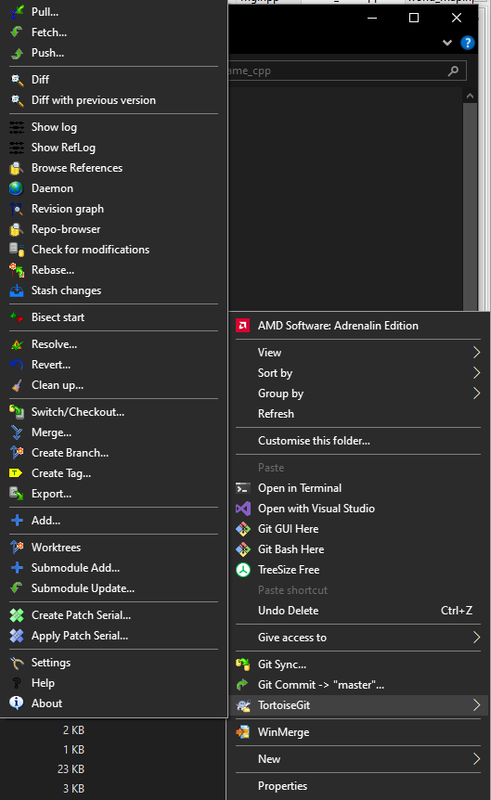
The sole app keeping me on windows is tortoisegit: you right click, and get a bunch of git commands on your context menu. If there was any way to get this running in linux, I'd swap
I don't know how similar it is, but KDE's Dolphin file manager has git integration, I don't know how similar it is to TortoiseGit, it might be worth checking out
This is something I have not heard before. Can you please explain your use case a bit more?
What commands do you run using right click? Do you strongly prefer this over a terminal window? You can have aliases if you'd like.
I do virtually everything through tortoisegit, and much prefer it over a CLI. When you right click, you get this:
https://i.postimg.cc/hG4g8pjp/tgit.png
Which gives you basically everything you could ever possibly want. My main use cases for it vs a terminal interface are:
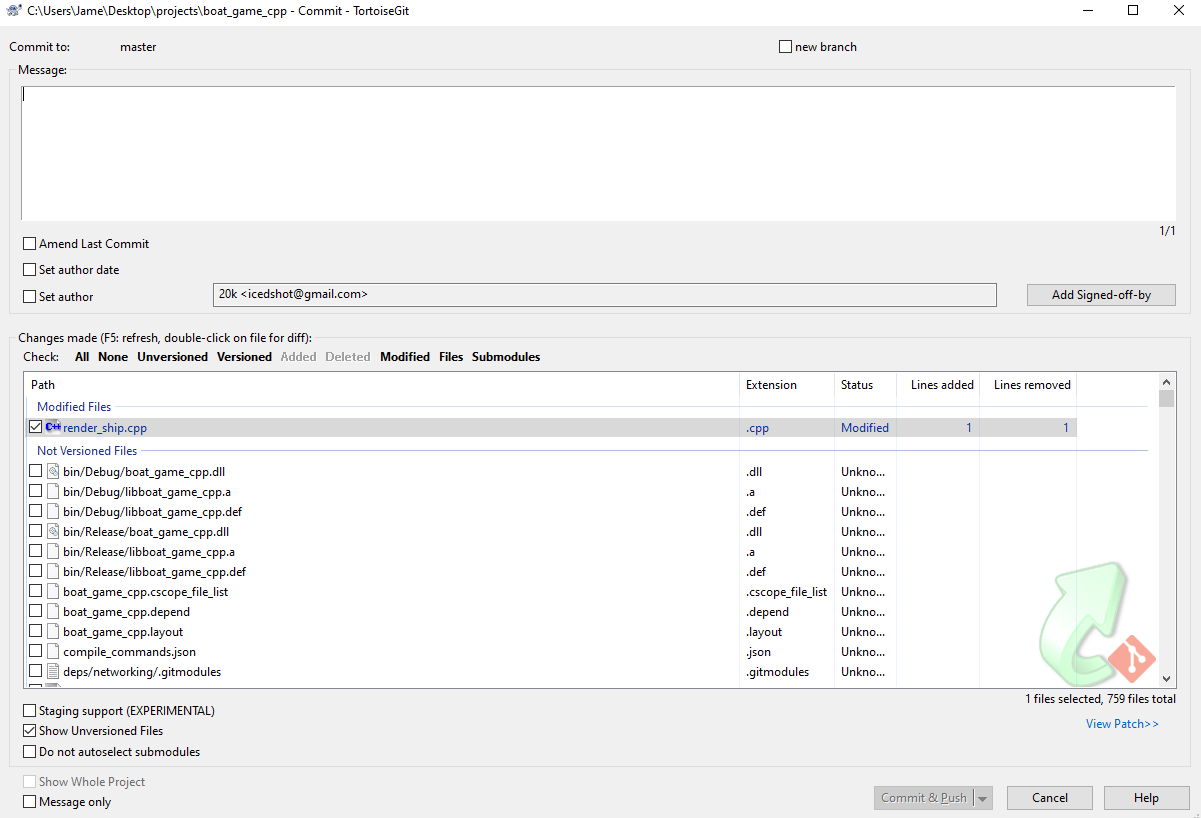
1. When you commit, you get this:
https://i.postimg.cc/90YJBtz1/boaty.png
Clicking the files brings up a diff, which makes pre commit reviews extremely easy. Its a lot faster to add files via an interface like this, rather than using a cli
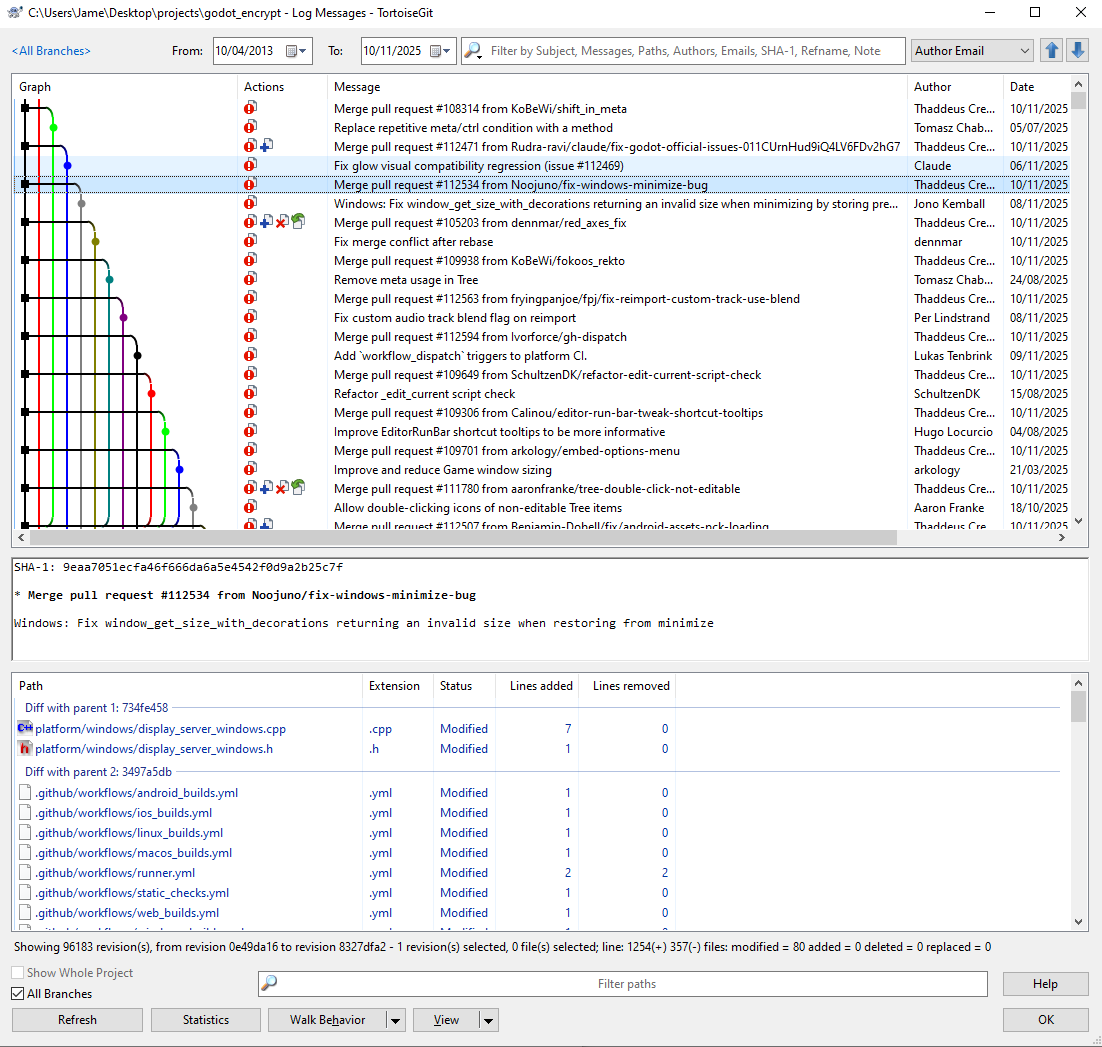
2. The graphical log feature is pretty indispensable for complex projects. Eg check out this:
https://i.postimg.cc/qRb76Wxj/godot-mergy.png
This is much nicer than trying to do grok this through the cli for me. Reverting commits, cherrypicking, merges, splicing the history, seeing all the available branches, keeping track of orphaned commits etc, is all super easy
3. If I have to pick between not remembering the CLI commands off the top of my head, and having to memorise and alias a whole bunch of commands to be able to use git fully, I'll pick the former every day. Its the same reason I use an IDE
I wouldn't object to it being a standalone tool, but the nice thing about it being on the context menu is that it doesn't intrude when you don't need it
Any modern IDE has those functionalities, and most of them run on Linux too. I don't think there is anything you have shown that warrants sticking to Tortoise Git instead of any other IDE.
Also if you don't want to use an IDE Gnome's file manager nautilus supports scripts available on right click. This would allows you to run git commands from the file manager , show the information you need using [YAD](https://yad-guide.ingk.se/#_introduction)
Tortoisegit isn't an ide though, and the quality of git integration varies wildly between different ides - many of them have pretty toy integration. Its much nicer to have proper quality support of uniform quality, rather than having to rely on whatever you happen to be using at the time
Ideally I'd like to avoid having to reimplement the whole thing from scratch using ad-hoc scripts
There seem to be some git tools on Linux that integrate with some filemanagers e.g. https://flathub.org/en/apps/de.philippun1.turtle
I stand boggled.
Try git cola.
Note that it currently only works with xfreerdp¹, so that means you share the X11 socket with this program. Although freerdp is also available for Wayland, the single app mode (aka RemoteApp aka RAILS) reportedly has not been implemented yet on the SDL port.
I've had mixed results with this, recent versions of Adobe in particular gave me trouble.
I've been meaning to try WinBoat, but it's based on the same underlying technology (docker+RDP) so I'm guessing I'll hit the same bugs. I was thinking maybe i could alter the code to launch a different RDP client instead of the default.
Still, if you just need Office, it's a much more integrated setup than you can easily achieve with VMs.
Just some anecdata, I had a poor experience with this project.
My setup used a qemu vm with gpu passthrough. I set the correct group policy settings to force the RDP host to use the vfio gpu.
Compared to looking glass (looking-glass.io), winapps was unusably slow. Beyond that, I experienced app-breaking UI glitches in the Adobe CC tools.
Love the concept, but in my experience this needs some more time to bake.
If this works as expect, I love it. I'm assuming the user doesn't need to manually configure the containers etc; it sounds like from the Readme it's low-friction. From a performance and disk space perspective, I'm not thrilled about containers. I think their existence here and in general cuts to a deeper concern we can fix.
Here's what I'd like to see for GPOS software in general. (Win, Linux, Mac, any new ones we get) Minimal or no ABI barriers. You compile software for a given CPU architecture, and it just works on all suitable operating systems. No barriers; no friction. There are some OS specific things people use like file systems, threads, and allocators, but these are usually somewhat general, and are abstracted over by the programming language's standard libraries.
This is a worthwhile goal, and technically is feasible. Within Windows, this generally works pretty well; I think a reasonable goal is to get this working within Linux as a whole. Then cross Win/Linux, and maybe even Mac. OSs should be making our lives easier; not putting up barriers. Especially with the Linux free/OSS mindset. I wish UX and Compatibility were part of the ethos too; I think it's relevant.
How about GPU acceleration, for e.g. Affinity?
Probably works the same as any other container that needs such acceleration (plex, CUDA) just pass the device over and the CAPs. There are guides online. Whether or not the windows in a container will use it idk.
Windows is virtualised here.
Yeah and you can pass a virtualized GPU to a VM
What is the state of virtio gpu drivers? I was under the impression that you only get opengl acceleration unless you pass over a whole GPU.
It should work just fine with Intel GPUs at least
Works on wine via vulcan/opencl
Does this even work?
podman run mcr.microsoft.com/windows:ltsc2019
Trying to pull mcr.microsoft.com/windows:ltsc2019...
Error: choosing an image from manifest list docker://mcr.microsoft.com/windows:ltsc2019: no image found in manifest list for architecture amd64, variant "", OS linux
This runs a container then virtualizes Windows inside it using KVM
As you can see - running the container doesn't work.
Ok. Can you run WSL inside of it?
Hah! Even better question is can you run it inside WSL?
It really whips the llamas ass ....
This popped into my head before I had a second to do a double take.
I would be looking for a solution to run Minecraft official launcher in Linux. It is heavily integrated with Windows extras such as the Microsoft Store.
This is the last holdout to get my children on Linux.
What's missing from the launcher available on Linux? I've been using it for many years, but I have never used in on Windows.
There are two editions: Java and Bedrock. Bedrock is the one that's got Realms, which is the easy way to get servers running.
Have this problem with my brother and nephew, would love to get the lad on Linux, but this is a real obstacle.
Java edition can also use Realms. I'm playing on a realm using Linux Java edition and the official launcher now.
Oh aye? I'll have a look into that, cheers. Totally had it in my head that was a blocker.
What is missing from the unofficial Bedrock launcher?
Well it will work nicely if you have a decently modern setup I guess. But I suspect the experience on a 10+ yo laptop would not be that great.
I tried to get it set up so I could boot into my Windows partition natively and also boot it in a VM in Qemu on Linux and, what a nightmare.
Windows have wsl and linux have wine,winapps etc
at some point in the future, Your OS wouldnt matters because all OS is reaching feature parity
The OS matters, because if it belongs to a mega-corporation, it serves its goals, not yours. Examples: Windows spying on users, iOS not allowing 3rd-party apps without you providing all your private data to Apple.
Won't happen because of remote attestation and integrity verification.
I wish VMware ThinApp was still around
Lol, at that point I would just run Windows...
What is the threshold where you are basically running Windows, and you have Linux installed just for some internet vanity?
Play games? Run Windows games with Wine/Proton Coding? VSCode App? This thing...
But at least I don't own Windows, sheej!
I don't think it's about internet vanity, more about not constantly having advertisements or weird services / AI features pushed into your desktop environment.
I'd love to just run windows if there was a version that didn't have this.
Why not just disable them?
Because they constantly get re-enabled, or new ones get added, and I don't want to have to fight my OS this hard.
https://get.activated.win wouldn't be online if microsoft cared.
Microsoft doesn't care if a home or hobbyist user uses this, because enforcing the license against such a user is not worth it as the payout wouldn't even cover their own effort/lawyers.
Microsoft may absolutely care if you use this at work (even by accident, by bringing your personal machine to the office) since that's where they can collect a decent amount of money for a license breach.
speaking from office / work perspective microsoft is actually not the company that cares either, you receive a bounty/payout for reporting license violations within your company.
IANA (iamnotamerican) so cannot really confirm except for 2nd hand knowledge, but in my european country every company I've been around in just uses pirated everything.
Also this is a tool that breaches several agreements and laws, including the particulary nasty one of DMCA (breaking digital locks) if anything this is the one thing microsoft should care about rather than individual users breaking said license.
what is this?
massgrave.dev
From massgrave.dev, just below the big heading:
Open-source Windows and Office activator featuring HWID, Ohook, TSforge, and Online KMS activation methods, along with advanced troubleshooting.
it is in the name get.activated.win(dows)
no, this system does not work by launching the windows containers on windows mcr.microsoft.com/windows images
it works by using dockurr, which is a great project but a worse way to distribute windows in the sense that it gets installed instead of downloaded and executed
I don't get it. Is it a VM in a container? Skimming https://hub.docker.com/r/microsoft/windows I would have interpreted that as a native Windows container, which I vaguely recall being a thing, but that would require an NT host, not Linux.
I remember Windows containers have two modes of operation as a Hyper-V VM and some sort of container-like isolation. I think the reason is that they had to quickly ship "containers" initially and that Windows does not have a kernel backwards compatibility the same way Linux does
https://learn.microsoft.com/en-us/virtualization/windowscont...
The container is a Linux container running a virtual machine inside.
WinApps needs a Windows RDP server to work. Most of the functionality doesn't care where that Windows RDP server is actually running as long as its FreeRDP client can connect to it. The container or libvirt VM options are just ways to accomplish that via virtualization.
I imagine the container part makes it easier to automate QEMU virtualization using bash scripting without worrying about distribution specific differences in the environment. These kinds of scripts become fairly ossified to their environment. Making them run consistently on different Linux distributions is its own adventure unrelated to installing and running Windows, so the containerization eliminates the need for a lot more bash scripting to account for those differences.
The container's bash scripts download the Windows installer ISOs and run them in an unattended mode inside a QEMU VM. The unattended installation is configured to skip activation:
- https://github.com/dockur/windows/blob/c7aac1edcf37a69ff730d...
- https://github.com/dockur/windows/blob/c7aac1edcf37a69ff730d...
- https://github.com/dockur/windows/blob/c7aac1edcf37a69ff730d...
Once the container is running, WinApps configures RDP via some scripts and registry settings exposed into the container via a volume so the container's scripts can copy and run them in the Windows VM:
- https://github.com/winapps-org/winapps/blob/b4766336903d0cbe...
- https://github.com/winapps-org/winapps/blob/main/oem/RDPApps...
You can do it all yourself too with your own libvirt VM, but it's just more involved:
- https://github.com/winapps-org/winapps/blob/main/docs/libvir...
I haven't seen any of this before, but I think it's a pretty clever use of scripting and containers on top of some fairly mature but hard to use pieces of software.
It is a container in a VM. I'm not even sure what, if anything, the container achieves. But their installation instructions are pretty clear that you start by creating a Windows VM.
Most laptops have included Windows 10 or 11 licenses, which are valid for this use
Last time i checked a Windows 10 and 11 license does not permit running Windows in a virtualized environment.
That could have changed by now.
Last time I checked I did not agree to be bombarded with ads and have all my data tracked after paying 100+ for a piece of software...
There's a couple of terms in contract law, like fairness of obligations, unconscionability, disproportionate penalty, excessive advantage, etc. that the US seems to have forgotten. In the EU and other countries such... aberrations are struck down and unenforceable. People are still scared silly, but the ones that protest are usually left alone.
Your fault for not letting your drink at the bar get chemically analyzed before drinking it
Doesn't necessarily make it legal either, but proving that in court would require pitting your own wallet against Microsoft's.
Umm actually, you did. You also waived off the right to name your firstborn, and if you disagree, you’ve waived off your right to anything except arbitration. Sorry, I didn’t make the rules.
(Friendly reminder that legality, once again, ≠ morality. Victimless crimes can be illegal, and Enron fucking shit up and filing bankruptcy can be legal.)
then it would be illegal to use hyper-v, since windows is then run under a hypervisor.
In that case you are using a network protocol but one could argue you are still accessing the VM in the same local system the OS has been licensed for. It is a remote access from a software perspective but a local access from a user perspective.
RDP on the same system isn't remote access though.
You’re running it on the same fuckin machine you were originally licensed to run it on!
This is an ethics question, not a phrasing question.
>...and the license clearly states you need a valid Windows license to use them.
It's a license, not a cop.
I am surprised that one of the fetched scripts even hosted on Azure.
https://dev.azure.com/massgrave/Microsoft-Activation-Scripts......
Is this a new thing? That windows docker images can run a UI? It's been a while since I looked at them (we're talking 2017-2018?), but back then, one was limited to CLI/Server apps without any windows graphical interface.
I'm wondering when it changed? (or perhaps I missed something back then)